A token theft in Microsoft 365 is no longer a theoretical scenario; it is an active technique that allows an attacker to "impersonate" the user, even if you use MFA. If an attacker manages to copy those tokens (for example, using AiTM/man-in-the-middle phishing that clones the login page), they can reuse them to log in as that user without having to re-enable MFA.
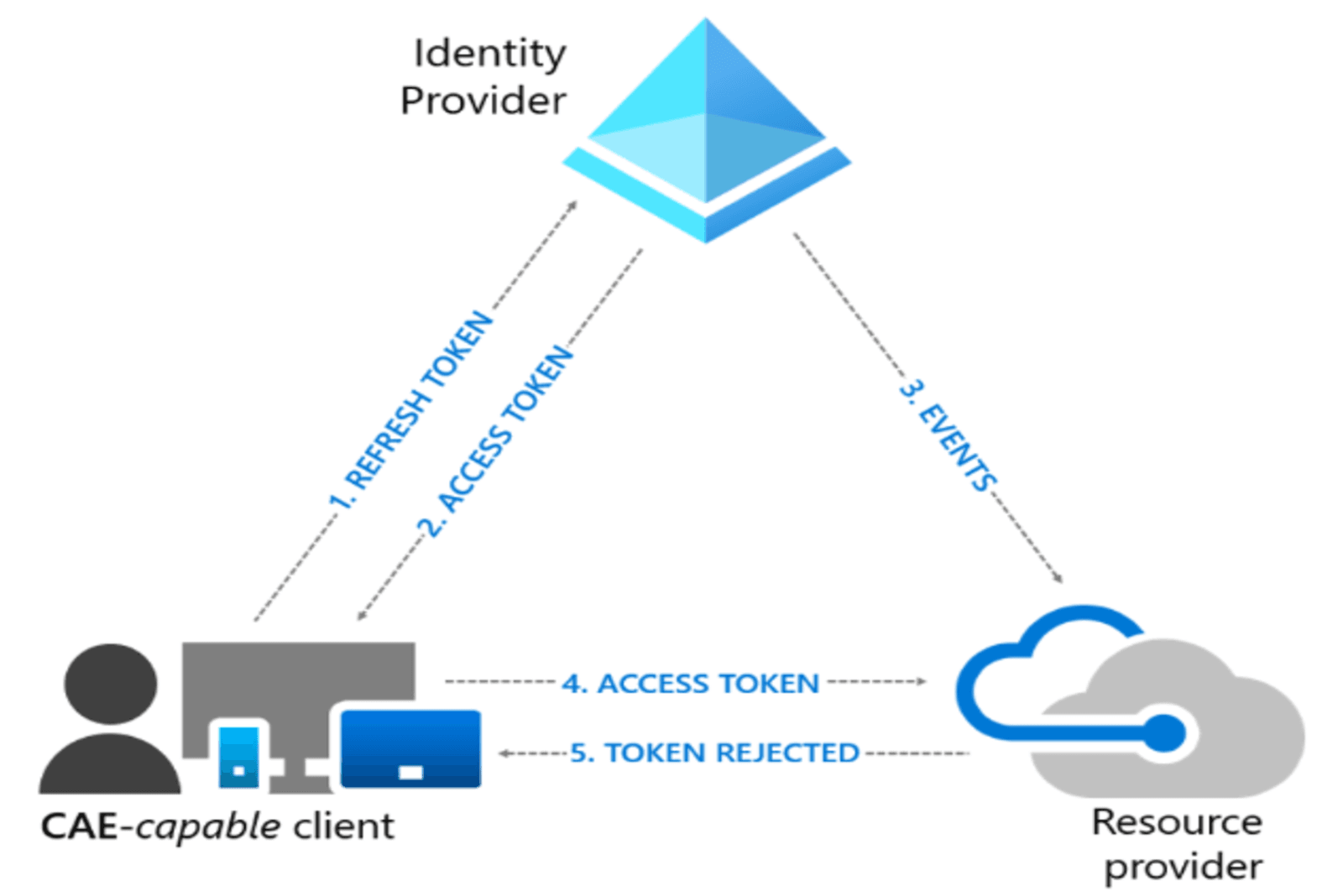
Conditional Access's Continuous Access Evaluation (CAE) helps "lock the door" almost in real time when a token has been stolen via phishing or other techniques, dramatically reducing the window of opportunity during which an attacker can move within Microsoft 365.
What is token theft, and why should you care?
In a Microsoft 365 environment, when a user authenticates (password + MFA), the platform issues access tokens that represent their session with services such as Exchange Online, SharePoint, Teams, or Graph. If an attacker manages to copy these tokens, they can reuse them to log in as that user without having to re-authenticate with MFA.
This approach has two dangerous consequences for any organization:
- The password is no longer the main issue: the attacker is already operating with a valid session.
- Traditional reactive measures (changing passwords, enforcing MFA, manually revoking sessions) may not immediately invalidate all stolen tokens if there are no mechanisms for continuous re-evaluation.
Continuous Access Evaluation: narrowing the operating window
Continuous Access Evaluation is a feature of Microsoft Entra ID that allows tokens to be re-evaluated in near real time when certain security or session conditions change. Instead of a token remaining valid until its scheduled expiration, CAE triggers a "review" of the token, and, if necessary, its immediate revocation, when specific events occur.
Events that can trigger such a reevaluation include: account deactivation, password changes, an increase in risk level, modifications to Conditional Access policies, or location changes that violate defined rules. When it comes to token theft, this means that:
- If you detect that an identity has been compromised and flag it as such, the associated tokens can become invalid almost instantly, reducing the attacker's window of opportunity.
- If the attacker attempts to reuse a token from an unexpected IP address or country, the combination of CAE with location policies can force a new challenge or block the session.
Conditional Access and token protection: raising the level of control
Conditional Access remains the framework through which you define "who can access, from where, how, and what" in your tenant. When it comes to the risk of token theft, there are three key configuration settings that are particularly helpful:
- Specific policies for high-value accounts (VIP, finance, admins)
- Risk-based policies
- Token protection / token binding
In practice, this means that a stolen token is much more likely to be useless if it is not used under the expected conditions (device, location, risk).
Defender for Office 365: Reducing the Risk of Token Theft
While CAE and Conditional Access mitigate the impact once a token has been issued, Defender for Office 365 works to prevent attackers from stealing it in the first place. Its key capabilities for this scenario include:
- Advanced anti-phishing and impersonation policies to detect and block emails that attempt to impersonate users, executives, or trusted vendors, reducing the effectiveness of attackers.
- Safe Links to rewrite and analyze URLs in emails and documents, dynamically blocking malicious sites that mimic the Microsoft 365 login portal.
- Safe Attachments to execute suspicious attachments in isolated environments before delivering them to the user, cutting off payloads that often accompany identity theft campaigns.
With these features properly configured, the likelihood that a user will enter credentials on an AiTM page decreases significantly.
How the NeoDefender team can help you
Properly implementing CAE, Advanced Conditional Access, and Defender for Office 365 isn't just a matter of enabling options, it requires an understanding of your business model, your access flows, and your specific risks. The NeoDefender team can support you throughout the entire process:
- Assess your current posture against token theft by identifying gaps in configuration, visibility, and response processes.
- Design and deploy Conditional Access policies aligned with CAE and your operational requirements, minimizing impact on end users without sacrificing security.
- Plan, configure, and fine-tune Defender for Office 365 (anti-phishing, Safe Links, Safe Attachments, attack simulations) so that your users, emails, and sessions are better protected.
With a well-designed strategy and expert guidance, your organization can move beyond relying solely on passwords and MFA to actively managing the session lifecycle, thereby reducing both the likelihood of token theft and the impact should it occur. Schedule a call with the NeoDefender team and discover how we can help you implement best practices tailored to your needs.