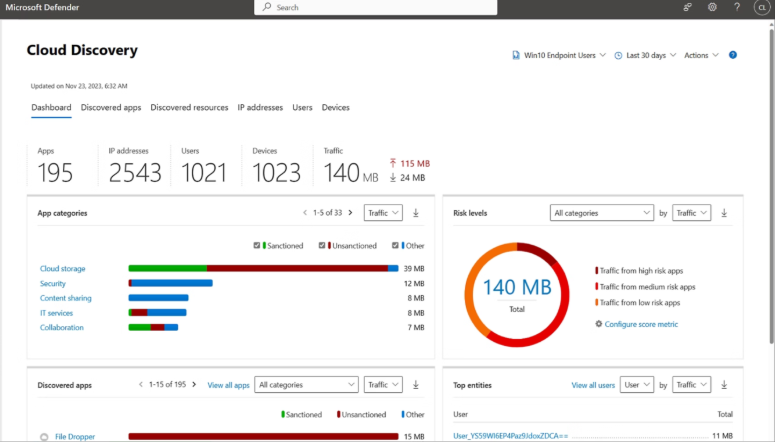


When we activate Microsoft Defender for Cloud Apps Cloud Discovery on a tenant that has never used it before, the first 48 hours produce one of the most uncomfortable reports we deliver in our audits. Leadership teams sit down expecting a list of "tools the IT department doesn't know about" and instead see a 250-line inventory of cloud applications their employees are actively using, most of which were never reviewed, approved, or evaluated for risk.
The pattern is consistent across organizations. The numbers vary, the specific apps change, but the categories of what we find are remarkably stable. This post is about what those 250 lines typically contain, why they are there, and what the discovery process actually reveals about how modern work happens.
If you have not yet read our post on Microsoft Purview and Defender for Cloud Apps as a layered defense, this one is a deeper look at one specific Defender for Cloud Apps capability.
What Cloud Discovery actually does
Cloud Discovery analyzes traffic logs (from firewalls, secure web gateways, Defender for Endpoint, or other sources) and matches the destinations against Microsoft's catalog of over 31,000 cataloged cloud applications. For each app, it returns a risk score based on 80+ factors including data residency, regulatory compliance (GDPR, HIPAA, SOC 2, PCI-DSS), security features (MFA support, encryption at rest, breach history), and the vendor's overall security posture.
The output is a list of every cloud application your organization is touching, ranked by usage volume and security risk, with the option to sanction (approve), unsanction (block), or monitor each one.
This is included in Microsoft 365 E5, in Defender for Cloud Apps standalone licensing, and in EMS E5. It is not included in Business Premium without an add-on. As we noted in our post on what we found auditing 50 Microsoft 365 tenants, even in tenants where the license is available, Cloud Discovery is the single most universally unconfigured product we encounter.
The pattern of what we find: category by category
After running the discovery on dozens of tenants, the inventory of cloud applications falls into seven recurring categories. The names of specific apps change. The categories themselves do not.
1. Sanctioned core productivity (5-15 apps)
This is the part leadership expects to see: Microsoft 365, Salesforce, the company's project management tool, the accounting system, the HRIS. These applications are usually well-governed, have SSO configured, and are in the company's vendor inventory. They typically generate the highest traffic volume but the lowest residual risk.
This category is reassuring. It confirms the IT team's mental model is correct for the things they explicitly procured.
2. Personal productivity tools used for work (15-30 apps)
This is where the discomfort begins. Employees use Notion for personal task lists that contain client project notes. Trello boards for team coordination that contain customer information. Personal Google Docs that contain copy-pasted contract drafts. Personal Dropbox accounts that store presentations.
None of these were procured. None are sanctioned. All of them contain organizational data. The employees are not malicious; they are productive, and they reach for tools that work. The risk is that organizational data is sitting in tenant-isolated personal accounts where the company has no recovery rights, no audit visibility, and no control if the employee leaves.
3. Communication tools outside of Teams (5-10 apps)
WhatsApp Web. Personal Telegram. Personal Discord. Slack workspaces for industry communities that include channels where work topics get discussed. These show up consistently. Some of them are unavoidable (the supplier insists on WhatsApp, the client uses Discord). The discovery surfaces them and forces an explicit decision: sanction with policy, replace with Teams, or block.
4. AI and ChatGPT-class tools (10-25 apps, growing rapidly)
This category has exploded in the past 18 months. We routinely find:
- ChatGPT personal accounts being used to summarize internal documents.
- Claude.ai accounts processing client information.
- Perplexity for research that involves proprietary search queries.
- Bard / Gemini personal use against work content.
- Specialized AI tools (Jasper for marketing copy, Copy.ai, Writesonic, Otter.ai for meeting transcription, Fireflies, Granola).
- Image generators (Midjourney, Leonardo, DALL-E variants).
- Code assistants outside of GitHub Copilot (Cursor, Codeium, Tabnine personal).
The risk is straightforward: organizational data being processed by AI services that are not under enterprise agreements, with unclear data retention, training opt-out status, and jurisdiction. We covered the broader insider risk picture in our post on data breaches in the age of AI. Shadow AI is shadow IT with a faster-growing footprint.
5. File transfer and conversion utilities (5-10 apps)
PDF converters (SmallPDF, ILovePDF, PDF24). Image compressors. Video downloaders. Convertio. CloudConvert. These tools see organizational documents on their servers as a routine part of doing their job. Most of them have unclear retention policies. Some have logged breaches. All of them are used because they "just work" from a web browser.
This category surprises leadership the most because the tools feel innocuous. A PDF converter is not a productivity threat. The data being processed by it (signed contracts, financial statements, tax returns) is.
6. Marketing and design SaaS (10-20 apps)
Canva accounts (often personal, with brand assets uploaded). Figma free tier for design work. Adobe Express. Unsplash and Pexels logged for sourcing imagery. SurveyMonkey for client surveys. Mailchimp accounts created for one-off campaigns. Buffer or Hootsuite for social management.
Many of these are legitimate business tools that simply were never centralized. The discovery flags them and gives the marketing team a chance to consolidate licenses and ownership.
7. Direct security risks (5-15 apps)
This is the category that justifies the discovery's existence. Personal cloud storage with unrestricted upload (TransferNow, WeTransfer accounts), file hosts that have been used historically by attackers, VPN services that bypass the corporate gateway (Hola VPN, free VPN browser extensions), browser extensions that read clipboard and form data, anonymizing proxies, and unauthorized remote desktop tools (AnyDesk and TeamViewer personal accounts).
These are not always being used maliciously. Sometimes an employee installed a free VPN to access a geo-restricted site for personal reasons and the browser kept it active during work hours. But the corporate data flowing through these channels has the same risk regardless of intent.
What discovery reveals that goes beyond the app list
The 250-line inventory is the tactical output. The strategic insight is what the pattern of applications tells you about the organization.
Where IT was responsive. Categories with low shadow IT (e.g., sanctioned core productivity is healthy) indicate where IT and procurement were ahead of demand. Categories with high shadow IT (e.g., AI tools, file converters) indicate where the organization moved faster than IT's roadmap.
Where governance gaps exist. When the same category shows 15-20 different tools serving similar functions (10 different PDF converters, 8 different AI assistants), it usually means there is no procurement framework for that category. Employees pick what they find first.
Where data is leaving the perimeter. High-volume traffic to specific destinations that should have low volume (personal Google Drive, personal Dropbox) often indicates either a process gap or an active data exfiltration risk that warrants deeper investigation.
Where future regulatory exposure is building. For organizations subject to GDPR, HIPAA, GLBA, FFIEC, or similar regimes, the discovery surfaces every cloud destination that may need to appear on a data flow diagram or vendor risk assessment. Most leadership teams discover their actual cloud footprint is 3-5x larger than they had documented.
What we do with the findings
Discovery without remediation is just expensive paperwork. The output of the discovery becomes the input for a sequenced governance program:
Phase 1: Triage the high-risk findings. Apps in category 7 (direct security risks) and high-risk AI tools (category 4) are evaluated immediately for sanction, block, or session control.
Phase 2: Consolidate the redundant categories. Where 8 different PDF converters are in use, pick one sanctioned vendor (or use Microsoft 365 built-in PDF capabilities), block the rest.
Phase 3: Build a sanctioned-tool catalog. For every recurring use case (file transfer, AI assistance, screen recording, scheduling), document the sanctioned tool and communicate it. Most shadow IT exists because the alternative is not visible.
Phase 4: Apply session policies for sanctioned-but-risky apps. Some applications need to be allowed but constrained. Defender for Cloud Apps session policies can prevent downloads from suspicious sessions, block file uploads to specific destinations, and apply DLP in-line. We covered the broader concept of session policies in Microsoft Purview and Defender for Cloud Apps.
Phase 5: Move to continuous monitoring. Cloud Discovery is not a one-time exercise. New apps appear constantly. The discovery should run continuously with monthly review cycles.
The licensing reality
For organizations on Microsoft 365 E5, Cloud Discovery is included and waiting to be turned on. For organizations on E3 or Business Premium, it requires a Defender for Cloud Apps add-on (roughly $3.50 per user per month) or a step up to E5 if the rest of the E5 stack is also being used.
For most SMBs, the standalone Defender for Cloud Apps add-on is the right answer. It costs significantly less than upgrading the entire tenant to E5, and it delivers the single highest-value Defender XDR component for the visibility it provides. We made this point in detail in our post on the accounting firm compliance case study.
The conversation we frequently have with leadership: "you can keep guessing what your real cloud footprint looks like, or you can pay $3.50 per user per month and know."
How NeoDefender helps
Our Data Protection service includes Defender for Cloud Apps deployment and ongoing governance as a standard component. The first activation produces the report described above; the subsequent quarters move the organization from a discovery posture to a managed posture.
If your tenant has Defender for Cloud Apps available and is not actively running Cloud Discovery, this is one of the highest-leverage gaps to close. The license you already have (or can add for very little) shows you what is actually happening in your cloud environment within 48 hours.
If you want to know what the 250-line report would look like for your tenant, schedule a Reality Check with the NeoDefender team. The discovery phase is included, and the findings tell you more about your real security posture than any other single assessment we run.